Paper Preparation and Submission
Guidelines for preparing papers for IPAC'27 proceedings
Paper submission will open in March, 2027, and will close on May 20, 2027.
JACoW Templates
Each submitting author is asked to submit a paper following the paper preparation guidelines. Use of the official JACoW templates is mandatory. Please Always download the latest version of the template before starting to write a paper, even if you are an experienced author and/or have submitted a paper in a previous JACoW conference. Please do not reuse the source files from previous papers to avoid use of possibly old template parts. Preparing the paper in is strongly preferred.
Template
The latest Latex class should be used. You may also use Overleaf to avoid local installation.
MS Word Template
The latest MS Word template should be used. Install the template (.dotx file) on your computer for best results.
Length of contributions
Papers for invited oral presentations may be up to 5 pages. Papers for both contributed oral and poster presentations may be up to 3 pages. If contributions contain numerous references, these may be carried over to an extra page. No other parts of the paper but references are allowed on this extra page.
Page limits will be strictly respected, all papers exceeding their limit will be returned to the author for revision or, at last, rejected.
Editing Tools and Recommendation
Detailed instructions on how to write a good JACoW paper are included in the JACoW LaTeX style guide and the JACoW MSWord style guide. We also suggest reading the following pages and using the linked tools to ensure the acceptable quality of your papers:
References
Incorrectly formatted references are one of the most common causes of delays in proceedings processing.
Basic rules:
- All bibliographical and web references should be numbered and listed at the end of the paper in a section called “References.”
- When citing a reference in the text, place the corresponding reference number in square brackets, e.g., [3].
- A URL may be included as part of a reference, but the hyperlink must be removed (In Word, use ctrl+k to remove).
Citations of JACoW publications
- To get citations of JACoW publications correctly formatted, use the JACoW Reference Search Tool. Use this tool for all JACoW conference related citations.
Citations of non–JACoW publications
- Always use the EXACT formatting of references and citations in the templates. More examples and details can be found in Annex B of the JACoW Style guide on the JACoW website.
Graphics
- It is important to keep in mind that graphics used in submitted papers must be clearly legible, readable, and comprehensible.
- Graphics generated from programs such as tracking simulations—where the figure is made up of very large numbers of points or vectors may cause problems. When converting such graphics to PDF, the software is unable to compress the files, resulting in thousands of elements being slowly "drawn" on the screen. Please refer to the “Working with Large Files” section of the Author Guidance on the JACoW website for information on handling large graphics files.
Paper Submission
All papers must be submitted by May 20, 2027.
Pre-Submission Checklist via Indico
Before uploading your files, log into the IPAC’27 Indico system, access the “My contributions” and:
1. Ensure the title in Indico matches your paper. Update Indico if necessary.
- In the paper: use ALL CAPS
- In Indico: use sentence case
2. Ensure the author list in your paper matches your Indico contribution. If not, update your contribution to include all authors and co-authors.
- One speaker must be identified, and it must match the actual presenter
- All co-authors must be listed correctly for proper indexing
Required Files for Submission
When your paper is ready, submit the following files through Indico(Example for paper code MOPA999):
1. Source file:
- Acceptable formats: .docx, .tex,
- Filename format: MOPA999.docx
2. PDF version of the paper:
- Must be created from the source file
- All fonts must be embedded
- Filename: MOPA999.pdf
3. Figures (uploaded as Supporting Files):
- Formats: .jpg, .png, .tif, .eps, .pdf, etc.
- Maintain original quality and ensure text is legible
- Filenames: MOPA999_f1.eps (figure 1) and MOPA999_f2.png (figure 2), etc.
Files must follow naming conventions. Otherwise, the “Submit” button will remain inactive. For example, if paper MOPA999 contains two figures, the file names should be:
- MOPA999.tex (or .docx, .odt, etc.): This is the source file and should be uploaded in the “Source File” upload box.
- MOPA999.pdf: This is the compiled PDF and should be uploaded in the “PDF” upload box.
- MOPA999_f1.eps (or .png, .tif, .jpg, .pdf, etc.): This corresponds to Figure 1. Figures and other supporting files should be uploaded in the “Other Supporting Files” upload box.
- MOPA999_f2.eps (or .png, .tif, .jpg, .pdf, etc.): This corresponds to Figure 2. Figures and other supporting files should be uploaded in the “Other Supporting Files” upload box.
- MOPA999.bib: This is the BibTeX file (if applicable) and should be uploaded in the “BibTeX file (only for LaTeX papers)” upload box.
How to Submit Files in Indico
1. Go to “My Contributions” under My Conference in Indico
2. Open your contribution
3. Scroll to the bottom and click “Submit files”
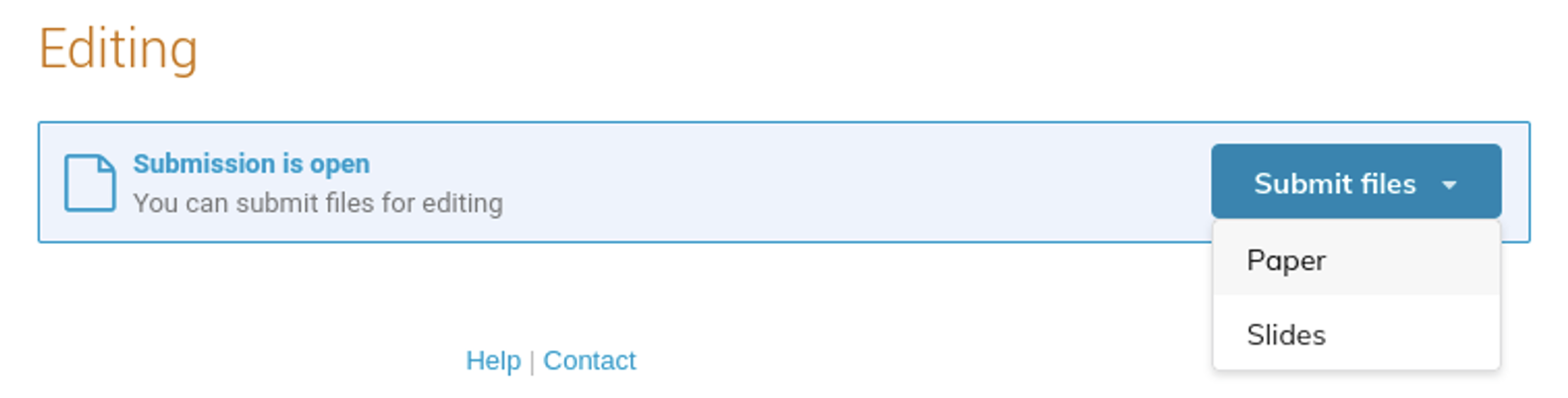
4. Choose the correct file type:
- Poster contributions: submit files for Paper only
- Oral contributions: submit files for Paper and Slides (see “speaker preparation guidelines” for slides submission)
5. Drag-and-drop or browse to upload files using the “+” sign
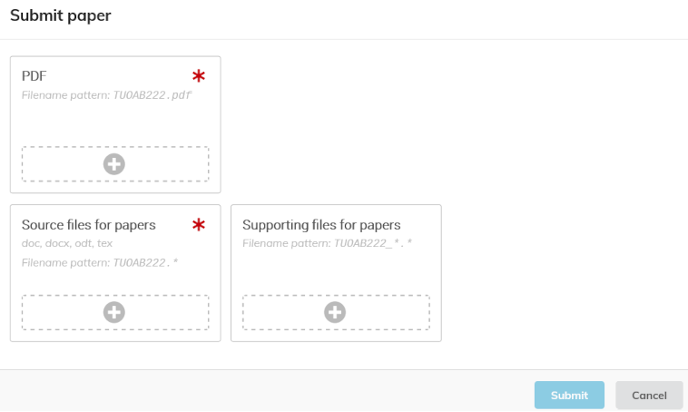
For complete instructions on using Indico, refer to the official documentation: Submit a paper to the conference.
For questions related to paper preparation, formatting, references, Indico access and file submission, please contact the IPAC'27 Scientific Secretariat.